First reminder after checkout drop-off
Send a personalized video shortly after abandonment while the product and intent are still fresh.
Abandoned cart recovery videos
Use this workflow when your normal cart recovery emails blend into the inbox. BHuman helps ecommerce teams send more personal reminders, product nudges, and checkout follow-up without recording a custom video for every shopper.
Trigger ideas
Send a personalized video shortly after abandonment while the product and intent are still fresh.
Use a more direct message for shoppers with larger carts or stronger purchase intent.
Add urgency with a personalized reminder before an offer expires or inventory changes.
Personalization
| Field | Example | Why it matters |
|---|---|---|
| first_name | Elena | Makes the follow-up feel like a real reminder instead of another automated campaign. |
| product_name | Cloud runner jacket | Keeps the message anchored to what the shopper actually cared about. |
| cart_value | $148 | Useful for segmenting high-intent carts and deciding when to use a stronger follow-up. |
| discount_code | COME-BACK10 | Lets the message include a specific nudge when an offer makes sense. |
| checkout_link | https://store.com/cart/restore/abc123 | Reduces friction by taking the shopper directly back to checkout. |
| store_name | Northline Goods | Adds brand context and helps the message feel consistent with your store. |
Setup
Start with one or two cases such as standard cart abandonment and high-value cart abandonment instead of trying to cover every shopper at once.
Use product name, cart value, offer, checkout link, and first name so the reminder feels specific without becoming overloaded.
Keep the message focused on returning to checkout, answering hesitation, or giving the shopper one reason to come back now.
Launch with CSV or exports first, then automate the send with your ecommerce stack or API once the sequence proves out.
CSV example
first_name,product_name,cart_value,discount_code,checkout_link,store_name,email
Elena,Cloud runner jacket,$148,COME-BACK10,https://store.com/cart/restore/abc123,Northline Goods,elena@northlinegoods.com
Copy ideas
Use these as starting points, then adapt the tone to your team and workflow.
Use this soon after abandonment while the product is still top of mind.
Hi {{first_name}}, I wanted to send a quick reminder in case you still meant to grab the {{product_name}} from {{store_name}}. Rather than let it sit in your cart, here is the fastest way back to checkout: {{checkout_link}}.
Use this for larger carts where a more personal nudge is worth the extra effort.
Hi {{first_name}}, I noticed you were close to checking out a cart worth {{cart_value}}. I wanted to send one quick note in case a small push helps. If it makes sense, you can use {{discount_code}} and complete your order here: {{checkout_link}}.
Use this when you want one final personalized push before closing the sequence.
Hi {{first_name}}, quick last reminder from {{store_name}} in case you still want the {{product_name}}. If you have been meaning to come back, your easiest next step is here: {{checkout_link}}.
Why BHuman
A personalized video changes the feel of the follow-up and can stand out after shoppers ignore the usual reminder sequence.
Teams can create a more human cart recovery flow without asking marketers to record one-off videos for every abandoned cart.
The same workflow can adapt by product, cart value, discount logic, and checkout link so the message stays relevant.
Proof
These examples come from public BHuman reviews and customer stories, not made-up placeholder proof.
20-30x
A BHuman customer shared that personalized welcome videos for new sign-ups increased response rates by 20 to 30x compared with the old approach.
Source: User of the Week: Dori O'Neill
3x
One public BHuman review says the first campaign delivered 3x response rates, which is the kind of improvement these workflow pages are designed to support.
Source: BHuman customer review
Scale
Another customer described BHuman as the only platform they could fully automate at scale without struggling with quality.
Source: BHuman customer review
Real assets
These are not generic mockups. They come from public BHuman pages and product screenshots, so buyers can see what the workflow looks like in practice.
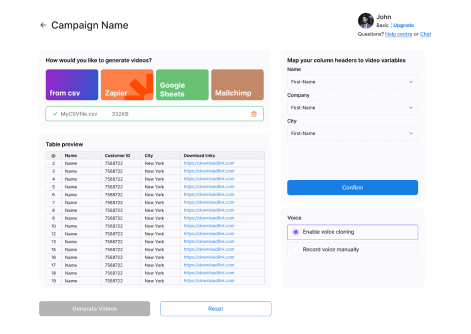
This is the actual BHuman flow for turning recipient data into video variables. It shows the kind of list-based setup these workflow pages are describing.
Source: BHuman product screenshot
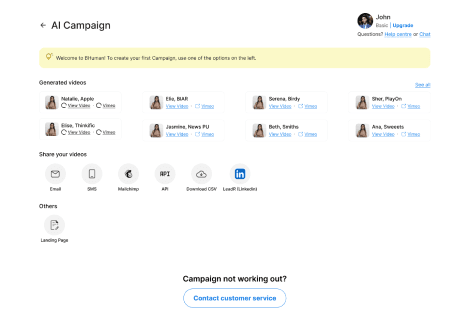
Once the videos are generated, BHuman can push them into email, SMS, API, CSV export, or landing-page workflows instead of keeping them trapped in a manual studio flow.
Source: BHuman product screenshot
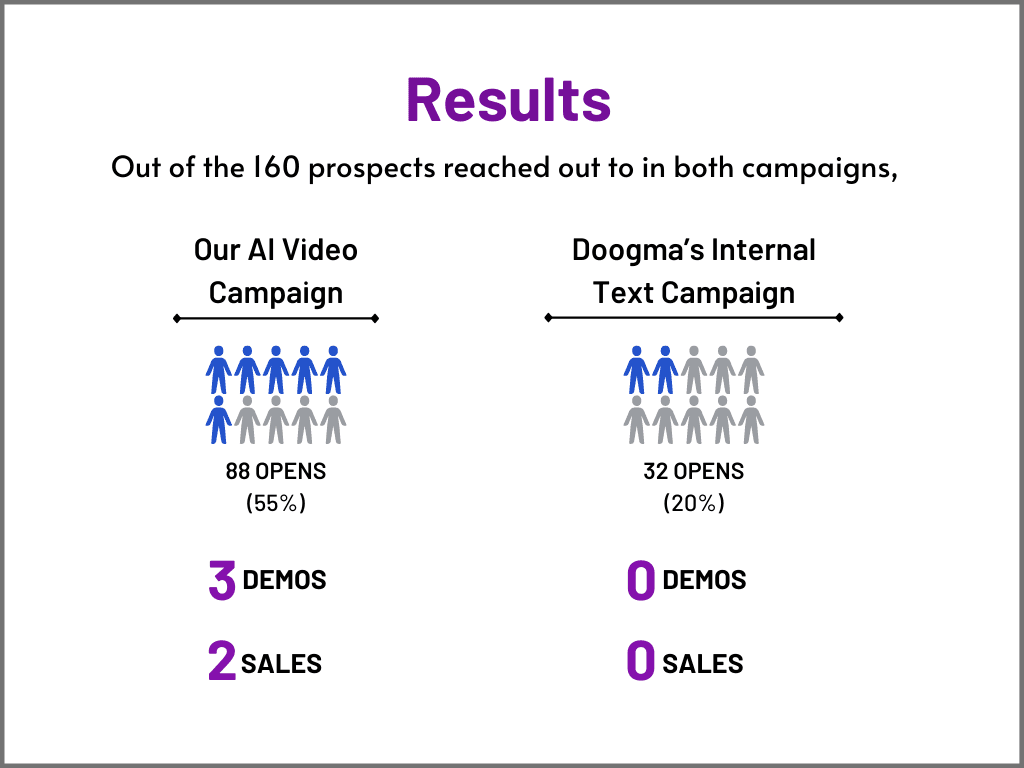
One public BHuman case study shows an AI video campaign outperforming the internal text campaign on opens, demos, and sales.
Source: BHuman case study
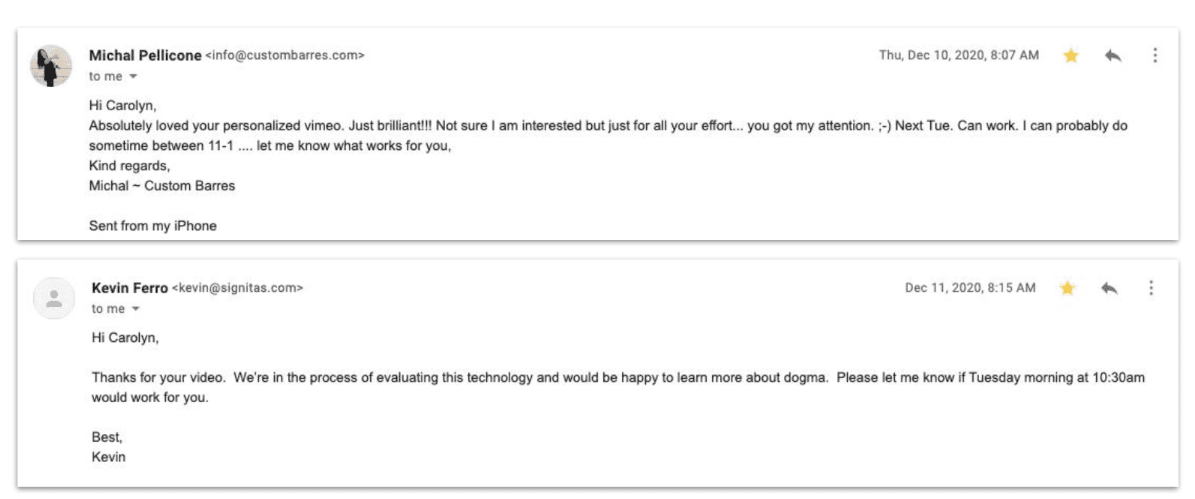
The same public case study also includes recipient replies, which is useful proof that the message felt personal enough to earn responses.
Source: BHuman case study
FAQ
The strongest times are shortly after abandonment, again for higher-intent carts, and once more before an offer or reminder sequence ends.
No. Many stores use them simply to remind shoppers what they left behind and make checkout easier to resume.
Start with the fields that change relevance most: first name, product, cart value, offer if applicable, and the direct checkout link.
Watch examples
These are public BHuman example videos connected to this same workflow motion, so buyers can see what the end result looks like before they dive deeper into setup.
Related pages
Useful if you are comparing a broad AI video studio with a more operational ecommerce recovery workflow.
The closest existing BHuman use case to this ecommerce workflow.
Useful if you want the wider ecommerce context around retention and conversion friction.
See how personalized video fits ecommerce engagement and sales more broadly.
More workflows
Record once, prepare a personal WhatsApp-ready video for every contact, and route it through Make, GoHighLevel, or your API.
A practical guide for using BHuman with HubSpot to send personalized videos after form fills, demo requests, and onboarding milestones.
Start free
No card required — just pick a template and upload your contact list.
Support
Demos and support requests start here. Tell us what kind of help you need and we’ll plug you into the right workflow.