Developers
Generate personalized videos from your own workflow.
Use the BHuman API when a product, CRM, form, pipeline, or automation needs to trigger AI Studio generation and collect completed video assets.
Reference
Reference links
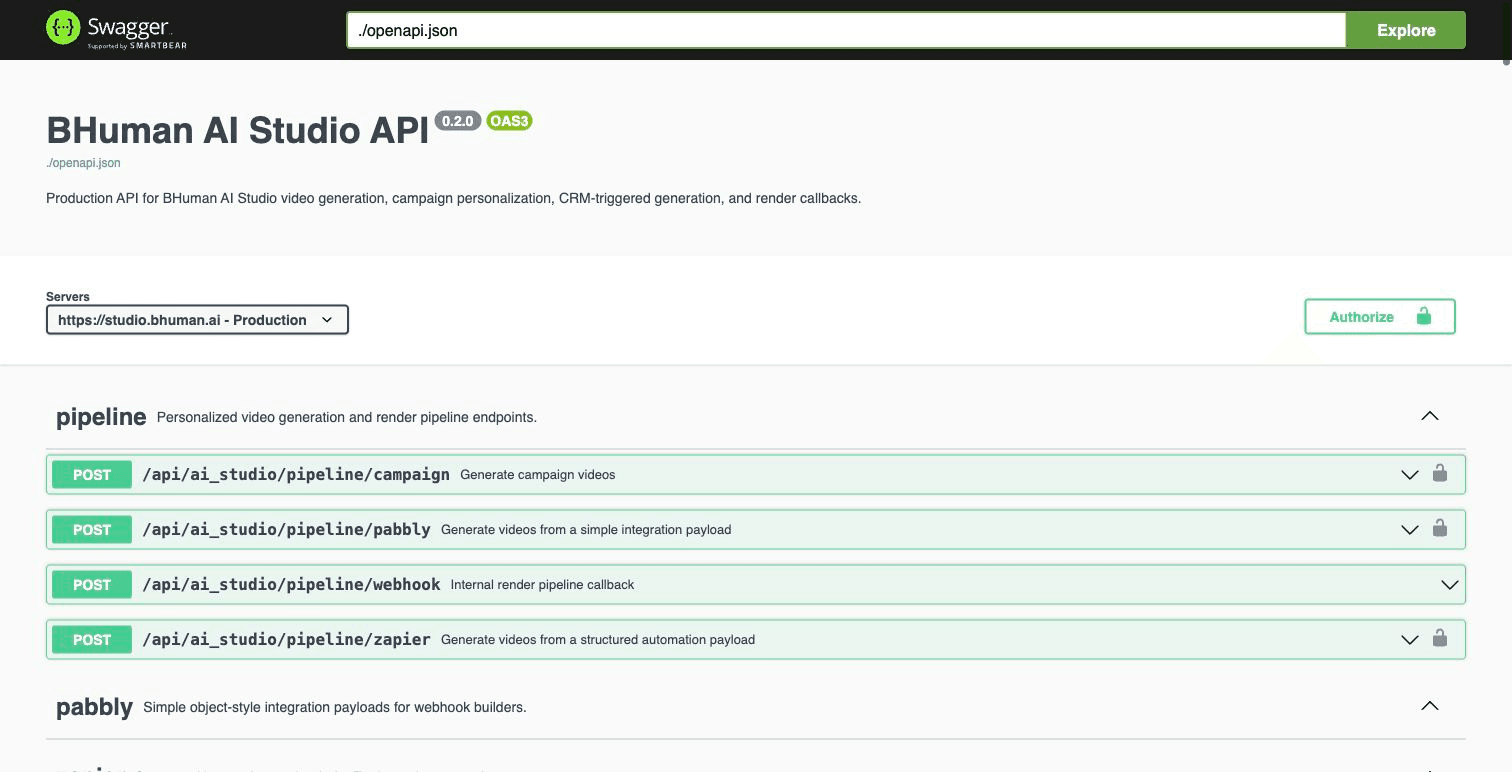
The guide on this page explains the integration model. Swagger is the live endpoint reference for schemas, optional fields, and response models.
Host
Base URL
Production host
Texthttps://studio.bhuman.ai
Auth
Authentication
BHuman API keys use Basic Authentication. Generate the client ID and client secret in BHuman Settings, then send the base64-encoded credentials in the Authorization header.
Create the auth header
Bashexport BHUMAN_API_KEY_ID="your_api_key_id" export BHUMAN_API_KEY_SECRET="your_api_key_secret" export BHUMAN_BASIC_AUTH=$(printf "%s:%s" "$BHUMAN_API_KEY_ID" "$BHUMAN_API_KEY_SECRET" | base64)
Keep API keys server-side
Quickstart
Generate campaign videos
- 01
Create an AI Studio template
Record, upload, or import a video and mark the variables that should be personalized. - 02
Create or identify the campaign
Use the campaign ID when generation should follow campaign settings such as mapped variables and background configuration. - 03
Send recipient rows
Choose a generation mode, then send variables and names in matching order. Each row in names creates one generated video. - 04
Collect generated assets
Use callbacks or polling endpoints to collect status, share URL, MP4 URL, thumbnail, and GIF preview.
Campaign generation
cURLcurl -X POST "https://studio.bhuman.ai/api/ai_studio/pipeline/campaign" \
-H "Authorization: Basic $BHUMAN_BASIC_AUTH" \
-H "Content-Type: application/json" \
-d '{
"campaign_id": "YOUR_CAMPAIGN_ID",
"generation_mode": "keep_original",
"variables": ["first_name", "company", "cta_url"],
"names": [
["Alex", "ExampleCo", "https://example.com/start"],
["Jordan", "Sample Labs", "https://example.com/book"]
],
"callback_url": "https://yourapp.com/bhuman/callback"
}'Accepted response
JSON{
"code": 200,
"result": [
"c10ee155-6202-4cec-9a40-dde536e2ab4e"
]
}Request
Common request fields
- campaign_id
- AI Studio campaign ID for campaign-based generation.
- video_instance_id
- AI Studio template ID for direct sample generation.
- variables
- Variable names in the same order as the values in each recipient row.
- names
- Recipient value rows. Each nested array maps by position to variables.
- generation_mode
- Generation strategy. Use keep_original or full_script, and send the field explicitly in every production request.
- infinitetalk_quality
- Smoothest-result quality only: standard is 480p at 1x credits; premium is 720p at 2x credits. It does not affect Keep Original.
- callback_url
- HTTPS URL that receives completion details after asynchronous rendering.
- assets
- Row-by-row background asset URL matrix. Each assets row maps to the matching names row, and each URL column maps to the matching backgrounds entry.
- backgrounds
- Dynamic background definitions for images, websites, or LinkedIn sources used during campaign generation.
- enable_lipsync
- Boolean option for templates and generation modes that support lip sync.
Video
Choose a generation mode
- keep_original
- Recommended default. Preserves as much of the original video as possible and changes only the personalized spoken sections.
- full_script
- Smoothest. Regenerates the whole video when overall visual smoothness matters more than preserving the original recording. Set infinitetalk_quality to standard for 480p at 1x credits or premium for 720p at 2x credits.
Set the mode explicitly
generation_mode in API requests so the intended behavior remains clear and stable.- Keep Original supports up to 100 personalized sections in one video.
- Each personalized section must be 10 seconds or shorter.
- Use full_script when a personalized section is longer than 10 seconds.
Variables
Send replacement values only
Fixed words already recorded in the template must not be repeated in variable values. For a template that says Hi {first_name}, welcome to {company}., send only the name and company.
Correct: replacement values only
JSON{
"campaign_id": "YOUR_CAMPAIGN_ID",
"generation_mode": "keep_original",
"variables": ["first_name", "company"],
"names": [
["Erada", "BrushandChemistry"]
]
}Wrong: fixed template words are repeated
JSON{
"campaign_id": "YOUR_CAMPAIGN_ID",
"generation_mode": "keep_original",
"variables": ["first_name", "company"],
"names": [
["Hi Erada", "welcome to BrushandChemistry"]
]
}Why this matters
Hi Erada for first_name makes the finished script say Hi Hi Erada. Send Eradainstead.Backgrounds
Dynamic backgrounds
Dynamic background replacement works through the campaign API, not only through the AI Studio interface. Send assets and backgrounds with POST /api/ai_studio/pipeline/campaign when each recipient needs a different image or page behind the speaker.
- The number of assets rows should match the number of names rows.
- Each assets row can contain one or more URLs, ordered to match the backgrounds array.
- Use kind values such as link, site, or linkedin depending on the background source configured for the campaign.
- For property or listing videos, send the per-recipient listing image URL in assets and keep the campaign template locked to the intended background layer.
Campaign generation with per-recipient backgrounds
JSON{
"campaign_id": "YOUR_CAMPAIGN_ID",
"generation_mode": "keep_original",
"variables": ["first_name", "property_address"],
"names": [
["Alex", "123 Main St"],
["Jordan", "9 Oak Ave"]
],
"assets": [
["https://cdn.example.com/alex-listing.jpg"],
["https://cdn.example.com/jordan-listing.jpg"]
],
"backgrounds": [
{
"name": "listing_photo",
"kind": "link",
"start": 0,
"end": -1,
"config": {
"mode": "none",
"scale": 0.42,
"position": "bottom-right",
"brightness": 1
}
}
],
"callback_url": "https://yourapp.com/bhuman/callback"
}Response
Polling response fields
- id
- Generated video ID.
- status
- Render state such as preparing, queued, processing, succeeded, failed, or completed.
- share_url
- Hosted video page or share destination returned by polling endpoints when available.
- url
- Downloadable MP4 URL.
- thumbnail
- Generated thumbnail image URL.
- gif
- Generated GIF preview URL.
- whatsapp_video_url
- Optional WhatsApp-ready MP4 URL. Polling responses include it after the derivative succeeds and omit it while unavailable.
- message
- Failure or processing detail when available. Show customers a support-safe code instead of raw render messages.
- execution_name
- Pipeline execution identifier when available.
- row_index
- The source row associated with the generated video.
Callback URL field
video_url for the hosted video page. Some polling responses use share_url. Receivers should accept both fields when normalizing generated media.Endpoints
Endpoint groups
- Pipeline generation
- POST /api/ai_studio/pipeline/campaign, /pipeline/zapier, /pipeline/pabbly, and /pipeline/leadr.
- Direct template generation
- POST /api/ai_studio/try_sample when a workflow targets a video_instance_id directly.
- Templates and campaigns
- GET video instances, one video instance, campaigns, and one campaign.
- Generated results
- GET generated videos by campaign ID, video instance ID, or generation ID.
- Speakeasy imports
- GET importable Speakeasy projects and POST a project import into AI Studio.
- Saved webhooks
- GET and POST reusable webhook destinations in AI Studio settings.
Pabbly-style payload
JSON{
"campaign_id": "YOUR_CAMPAIGN_ID",
"generation_mode": "keep_original",
"variables": {
"first_name": "Alex",
"company": "ExampleCo",
"cta_url": "https://example.com/start"
},
"callback_url": "https://yourapp.com/bhuman/callback"
}Import Speakeasy project
cURLcurl -X POST "https://studio.bhuman.ai/api/ai_studio/speakeasy_projects/import" \
-H "Authorization: Basic $BHUMAN_BASIC_AUTH" \
-H "Content-Type: application/json" \
-d '{
"project_id": "SPEAKEASY_PROJECT_ID",
"workspace_id": "OPTIONAL_WORKSPACE_ID"
}'Callbacks
Callbacks and polling
Use callbacks when your workflow needs to react as soon as rendering finishes. Store the generated video ID returned by the initial request so callback payloads can be matched to your records.
Successful callback example
JSON{
"id": "c10ee155-6202-4cec-9a40-dde536e2ab4e",
"campaign_id": "YOUR_CAMPAIGN_ID",
"status": "succeeded",
"video_url": "https://videos.bhuman.ai/video/c10ee155-6202-4cec-9a40-dde536e2ab4e",
"url": "https://assets.bhuman.ai/generated-video.mp4",
"thumbnail": "https://assets.bhuman.ai/thumb.jpg",
"gif": "https://assets.bhuman.ai/preview.gif",
"campaign_result_id": null
}Failed callback example
JSON{
"id": "c10ee155-6202-4cec-9a40-dde536e2ab4e",
"campaign_id": "YOUR_CAMPAIGN_ID",
"status": "failed",
"video_url": "",
"url": "",
"thumbnail": "",
"gif": "",
"campaign_result_id": null
}- Use HTTPS callback URLs.
- Allow duplicate delivery handling in your receiver.
- Store the generated video ID, campaign ID, and final media URLs before triggering downstream automation.
- Do not require whatsapp_video_url on the main completion callback; the field is optional.
- Poll generated video endpoints when callbacks are not configured or when a backfill is needed.
Collect the WhatsApp-ready video
Turn on WhatsApp video generation in the AI Studio campaign settings before calling the campaign generation endpoint. The setting belongs to the saved campaign; it is not a field in the generation request.
Main completion is not held while BHuman creates the WhatsApp-ready derivative. Your callback URL receives the normal completion payload first and a distinct readiness event after the derivative succeeds.
Later WhatsApp readiness event
JSON{
"event": "whatsapp.ready",
"id": "c10ee155-6202-4cec-9a40-dde536e2ab4e",
"campaign_id": "YOUR_CAMPAIGN_ID",
"whatsapp_video_url": "https://assets.bhuman.ai/generated-video-whatsapp.mp4"
}- Continue the main-video workflow when status = succeeded, even when whatsapp_video_url is absent.
- Route event = whatsapp.ready separately and join it to the existing record by id.
- Store whatsapp_video_url from the readiness event or retrieve it later from a generated-video polling endpoint.
- Use event type plus id for idempotency because both callbacks share the same generated-video ID.
- A missing whatsapp.ready event means the optional derivative was not produced; it does not change main-video success.
Errors
Validation and support
- 400
- Valid JSON that is not usable for the campaign, such as a variable count that does not match recipient values.
- 401
- Missing, invalid, or unauthorized Basic Authentication credentials.
- 422
- Request body or query shape could not be parsed, such as a malformed UUID or missing required field.
- Accepted then failed
- The generation was queued successfully, but asynchronous rendering later failed. Handle this through callback or polling status.
Customer-safe render failures
Scale
Scale and testing
- Generation is asynchronous. A successful request means the rows were accepted for rendering, not that the videos are ready inline.
- Test with two or three rows before submitting a large render batch.
- Campaign generation currently accepts up to 2,000 recipient rows per request.
- Keep Original supports up to 100 personalized sections per video, and each section must be 10 seconds or shorter.
- Before sending 50 or more concurrent generations, test the exact campaign, variable set, and asset sizes that will be used in production.
- There is no separate public sandbox, fixed public per-minute rate limit, or guaranteed render-latency SLA published for the API.
- Use API keys from BHuman Settings for evaluation and coordinate production volume expectations with BHuman support or your account team.
Compliance
Compliance and privacy
- If a generated video needs an AI disclosure, place the disclosure line in the AI Studio template as fixed copy rather than as a recipient variable.
- The API cannot remove fixed template copy during generation. Control template and campaign editing permissions so production disclosure text is not accidentally changed.
- Send only the recipient fields required for the video, such as first name, address, listing image URL, and CTA URL.
- Keep API keys and recipient data server-side. Do not place secrets or private recipient data in browser-side JavaScript.
- For retention, DPA, and account-specific privacy requirements, coordinate with BHuman support or your account team before launch.
Production
Production checks
- Test with two or three rows before submitting a large render batch.
- Keep variable names stable once a campaign, Zapier, Pabbly, or API workflow is live.
- Send only the replacement value for each variable, without fixed words already present in the template.
- Send generation_mode explicitly so the integration does not depend on a default.
- Send asset rows in the same order as recipient rows.
- Treat generated media as asynchronous outputs, not immediate inline responses.
- When WhatsApp video generation is enabled, process main completion and whatsapp.ready as separate events.
- Use Swagger for the latest endpoint-level request and response schema.