Product updates
Turn product changes into videos and published updates.
Product Updates connects brand setup, GitHub repositories, weekly summaries, feature review, walkthrough planning, video rendering, and publishing into one workflow.
Purpose
What Product Updates does
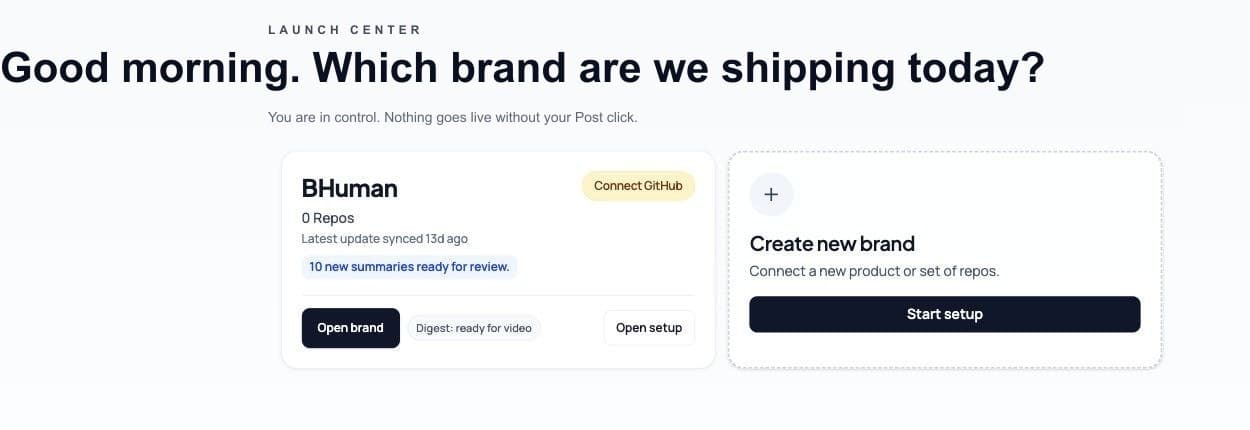
- Brand launchpad
- A brand groups repositories, posting channels, summaries, and video plans under one workspace.
- GitHub sync
- Connected repositories provide commit history and product-change context for summaries.
- Weekly summary
- A digest of recent changes that can be reviewed, edited, answered, and turned into a video plan.
- Video plan
- A structured script and visual plan created from selected summary features.
- Walkthrough
- A guided capture flow for product walkthrough videos, including storyboard, sign-in setup, and recording mode.
Setup
Brand setup
- 01
Create a brand
Name the brand once. Product Updates uses the brand to organize repos, channels, summaries, and videos. - 02
Connect GitHub
Authorize GitHub and connect repositories that belong to the brand. - 03
Assign repos
Choose which connected repositories should feed the brand's summaries and video plans. - 04
Configure channels
Connect the social channels that should be available when finished videos are posted.
Setup snapshots
A first-run summary may be a setup snapshot with no updates yet. After new commits land, generate a fresh summary to review real product changes.
Digest
Weekly summaries
- Generate a brand or repo summary on schedule or manually.
- Review detected feature clusters before creating a video plan.
- Edit cluster titles and summaries when the generated wording needs correction.
- Answer required questions before a video plan can be created.
- Upload screenshots or short MP4 assets for a summary or individual feature cluster.
Plans
Video plans
- Selected features
- Only selected and complete feature clusters are used when creating a plan.
- Per-cluster mode
- Create separate plan scripts for individual selected feature clusters when the update should be split.
- Rough cut
- Generate a rough visual cut before approval when the plan needs review.
- Approve
- Approval locks the plan inputs used by rendering and publishing.
- Render
- The approved plan can render into a video through the Product Updates pipeline.
Walkthrough
Walkthroughs
- 01
Preview the storyboard
Product Updates builds a flow map and storyboard from the connected repo or app context. - 02
Revise the storyboard
Add feedback when the planned route should focus on a different user flow or screen. - 03
Set up sign-in
Choose the simplest reliable login path before capture starts. Options include manual choices such as no login, existing account, magic link, or signup-style flows depending on the app. - 04
Add final notes
Provide anything the recorder should emphasize or avoid. - 05
Start capture or upload
Use auto capture when Speakeasy can record the flow, or user upload when a human-supplied walkthrough recording is the right source.
Publish
Publishing
- Post approved videos to connected channels when publishing is configured.
- Reuse uploaded assets and generated media across aspect ratios where supported.
- Track plan status from draft to rendering, publishing, completed, failed, or cancelled states.
- Open the latest summary from the brand studio to review new changes before creating another plan.