Campaigns
Connect data, map variables, and generate videos.
Campaigns turn one AI Studio template into many personalized videos. Each row supplies variable values, optional assets, and delivery context for one generated video.
Model
Campaigns are data-backed render jobs
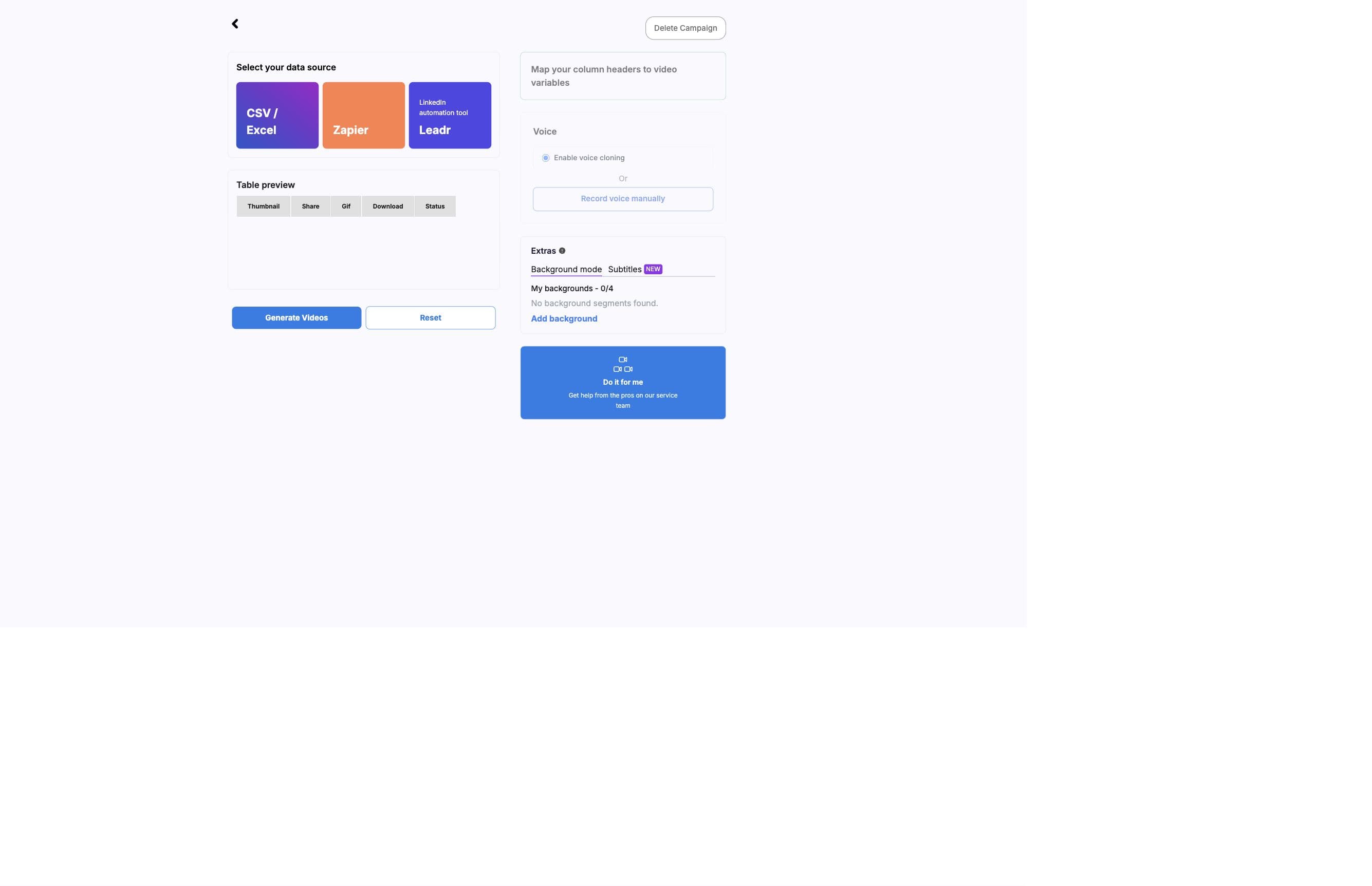
A campaign references an AI Studio template and a data source. The campaign maps columns or payload fields to template variables, then submits rows to the render pipeline.
Campaign generation is asynchronous. The setup page sends the render request, and the generated videos page monitors queued, preparing, processing, succeeded, failed, and needs-review results.
Setup
Campaign setup flow
- 01
Start from a ready template
Open Create new campaign from a template that has a source video and at least one variable. - 02
Choose Mini or Max
Select the viewing mode. Mini places the presenter over backgrounds and may add a default generic background. Max uses full-screen HD and can be gated by plan or face-distance checks. - 03
Load campaign data
Upload CSV or Excel, connect through Zapier, continue through Leadr, or trigger generation through Pabbly/API endpoints. - 04
Map variables
Map each template variable to a source column or payload field. Exact header matches are selected automatically when possible. - 05
Configure extras
Use background mode, subtitles, manual audio recording, landing page URLs, callbacks, or managed support when needed. - 06
Generate videos
AI Studio validates the campaign, posts to the pipeline, and sends you to generated results.
Data
Data sources campaigns can use
- CSV or Excel
- Use for manual batches, one-off campaigns, and test rows. Headers become mapping options.
- Zapier
- Use when a connected app should trigger BHuman generation through no-code automation.
- Leadr
- Use outreach and LinkedIn-style campaign data with optional personalized video template mappings.
- Pabbly
- Use when a workflow builder sends a simple object-style webhook payload.
- API
- Use when your product, CRM, backend, or form handler needs direct control over generation.
Configuration
Modes and extras
- Mini mode
- Presenter over background. Personalized moments must have background coverage, and AI Studio can add generic backgrounds for missing coverage.
- Max mode
- Full-screen HD output. Max can be disabled for plan limits or when the face is too close to camera.
- Background mode
- Timed background segments using generic desktop, direct media links, public websites, LinkedIn screenshots, uploads, or chroma key.
- Subtitles
- Campaign subtitles use the template transcript with row-specific variables inserted.
- Manual audio recording
- Record variable-specific audio when cloned or generated voice is not enough. This is disabled for store templates.
- Do It For Me
- A managed handoff path for users who want BHuman service support with launch.
Validation
Launch checks before generation
- A source video exists on the template.
- A valid data source is attached to the campaign.
- Every required variable has a mapped column or payload field.
- Each row has values for the mapped variables.
- Mini mode has background coverage for every personalized moment.
- Background mode rows include valid URLs or uploads for each timed segment.
- Manual audio is recorded if voice cloning is disabled for the campaign.
- Generation is available and the account has enough quota.
Reserved output columns
Mapping ignores reserved output headers such as thumbnail, share, download, GIF, and status so existing generated-asset columns do not accidentally become input variables.
Outputs
Generated outputs your workflow can use
- status
- Current render state.
- share_url
- Hosted video page or share destination when available.
- url
- Downloadable MP4 asset.
- thumbnail
- Generated thumbnail image.
- gif
- Generated GIF preview.
- message
- Failure or processing details when available.
- execution_name
- Pipeline execution identifier when available.
- row_index
- The source row associated with the generated video.
Next