Leadr
Build a Leadr campaign in six focused steps.
The current Leadr builder collects account selection, audience source, workflow actions, message copy, delivery pacing, optional AI Studio video, and final review before it starts worker-backed outreach.
Model
Builder model
The live builder is organized as Basics, Audience, Workflow, Message, Delivery, and Review. Earlier steps must be complete before later steps can be opened. When the campaign starts, Leadr creates one worker campaign for each selected active account.
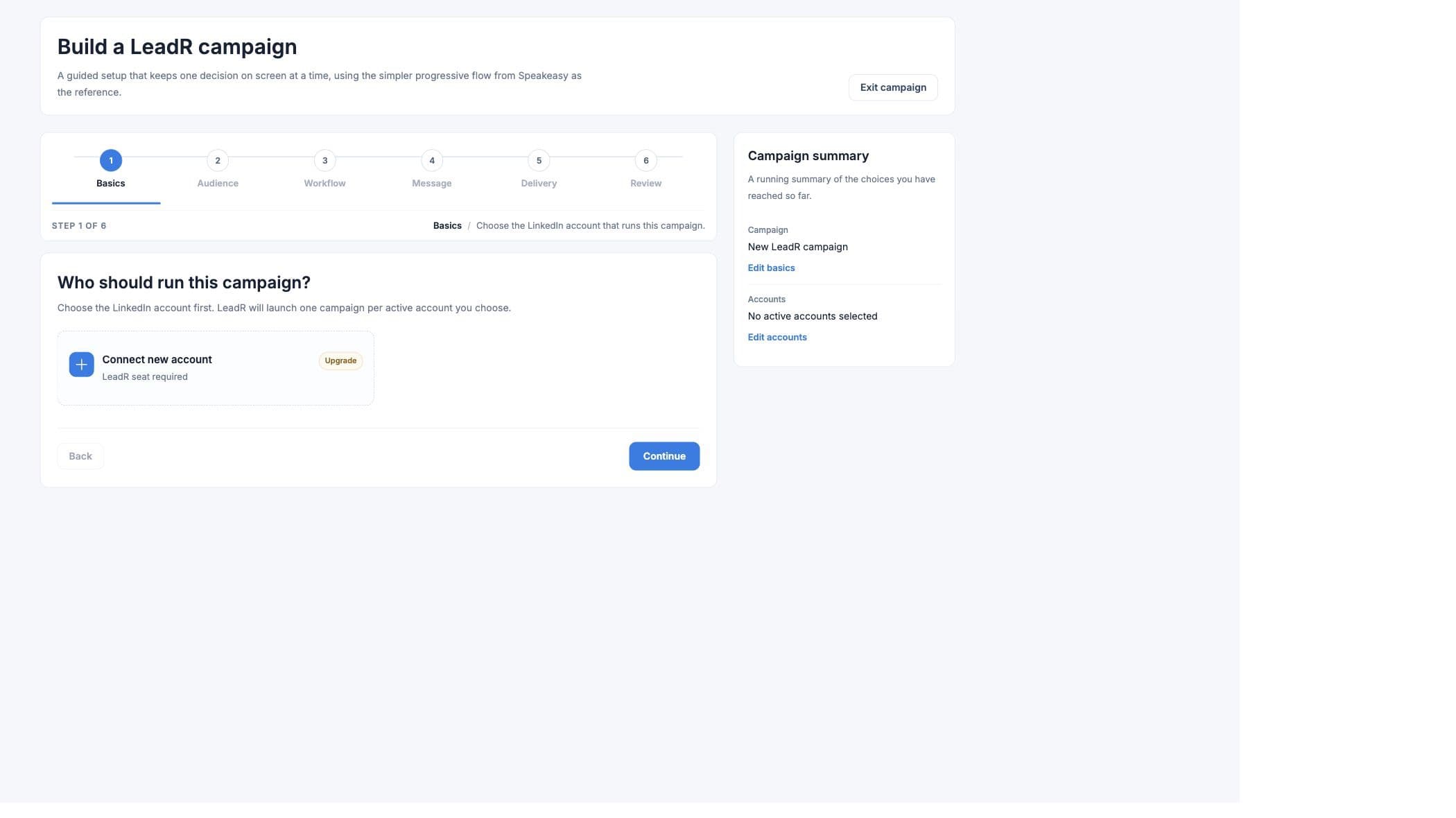
Workflow
Six builder steps
- 01
Basics
Select one or more active accounts and name the campaign. If exactly one active account exists and the user has not already selected another account, Leadr can preselect it. - 02
Audience
Choose a fixed LinkedIn search URL or discover people from signals. Signals can come from recent posts or hiring/company discovery prompts. - 03
Workflow
Choose a preset sequence or customize comment, like, invite, and message actions. - 04
Message
Draft copy from the setup, insert LinkedIn variables, use a template, send invites without a note, or lightly personalize each note. - 05
Delivery
Choose invite pace, active days, start time, and optional AI Studio video template mapping. - 06
Review
Review accounts, audience, workflow, message, delivery, and video status before starting the campaign.
Audience
Audience setup
- LinkedIn search URL
- Paste a LinkedIn people search when the target list is already known.
- Recent LinkedIn posts
- Monitor topics for intent posts or pain posts. Advanced settings choose Web or Posts as the signal source and can tune frustration keywords.
- Hiring and company signals
- Use a discovery prompt, optional location hint, and 1-30 day lookback window for hiring plans, open jobs, recent hires, tech stack, website signals, compliance, people, news, expansion, or custom signals.
- CSV upload
- CSV source selection is visible in parts of the product, but the launch flow blocks CSV execution until the worker path is wired.
Workflow
Workflow setup
- Warm intro
- Comment, like, invite, then follow up after acceptance.
- Standard connect
- Like first, then invite and follow up.
- Direct connect
- Send the invite first and message once accepted.
- Message connected leads
- Skip the invite and message existing connections.
- Advanced controls
- Toggle individual actions, choose comment auto or draft mode, set step spacing from 5-720 minutes, and set invite-to-message wait from 1-168 hours.
Message
Message setup
- Draft message uses the selected audience source and account names to create a starting note.
- Available variables are first name, last name, city, and headline.
- Templates include professional introduction, hiring manager, business opportunity, and candidate outreach examples.
- Invite note character limits are 200 characters without video and 130 characters with video.
- Message-only campaigns can use up to 500 characters.
- Send invite without a note disables the invite note and allows follow-up only after acceptance.
- Light personalization lets Leadr make small wording changes per recipient.
Delivery
Delivery setup
- Pace presets
- Conservative is 15 invites per week, Recommended is 20 invites per day, and High volume is 50 invites per day.
- Manual pacing
- The delivery slider supports 10-75 invites. Launch validation requires the final daily invite value to stay between 1 and 79.
- Active days
- Users can choose weekdays, every day, or individual days.
- Start time
- The builder stores an hourly start time. The worker schedules the search task two hours before the invite window.
- Personalized video
- Choose an AI Studio template, map each video segment to a Leadr field, and set default values for missing lead data.
Validation
Launch checks
- Select at least one active account.
- Set daily invites between 1 and 79.
- Name the campaign.
- Paste a LinkedIn search URL when not using signals.
- Select at least one signal type when using signals.
- Add post topics for post-based signals.
- Add a discovery prompt for discovery signals.
- Upload a CSV file only for CSV setup, while noting CSV execution is blocked.
- Enable at least one workflow action.
- Write a message or enable send-without-note for invite/message steps.
- For email fallback, select a verified Scale sender, subject, body, and an invite or connected-message step.
- Map every selected AI Studio video variable before launch.
What happens on launch
The frontend submits a campaign request to the Leadr worker for each selected active account. The worker verifies the account again, creates the campaign, acquires an account lease, schedules the search task, and later schedules workflow actions from the result rows.