90- or 60-day renewal reminder
Start the renewal conversation early with a message tailored to the account, plan, and next step.
Customer renewal video workflow
Use this workflow when renewal outreach needs to feel more personal than email alone. BHuman helps customer success teams send timely, relevant renewal videos at scale without asking each CSM to record every account touchpoint by hand.
Trigger ideas
Start the renewal conversation early with a message tailored to the account, plan, and next step.
Send a more personal outreach when product usage, support volume, or stakeholder engagement signals churn risk.
Use a personalized renewal message to tee up expansion where the account is healthy and engaged.
Personalization
| Field | Example | Why it matters |
|---|---|---|
| first_name | Sam | Keeps the message person-to-person rather than account-to-account only. |
| company_name | Lighthouse AI | Useful for making the video feel specific to the customer's team. |
| renewal_date | June 30 | Anchors the message around a concrete timeline and next action. |
| plan_name | Growth | Lets the video reference the right package or account scope. |
| csm_name | Priya | Makes it clear who owns the next step and conversation. |
| booking_link | https://calendly.com/priya/renewal-review | Gives each account a direct route to the renewal conversation. |
Setup
Start with one branch such as 90-day reminder, 30-day push, or at-risk renewal outreach.
Use renewal date, plan, owner, and any health or expansion signal that changes the tone of the video.
This keeps the message relevant and avoids a one-size-fits-all renewal motion.
Launch with CSV or recurring exports, then automate more deeply if the workflow proves effective.
CSV example
first_name,company_name,renewal_date,plan_name,csm_name,booking_link,email
Sam,Lighthouse AI,June 30,Growth,Priya,https://calendly.com/priya/renewal-review,sam@lighthouse.ai
Copy ideas
Use these as starting points, then adapt the tone to your team and workflow.
Use this for healthy accounts when you want to start the renewal conversation early.
Hi {{first_name}}, I wanted to send a quick note as {{company_name}} gets closer to your {{renewal_date}} renewal. You are currently on the {{plan_name}} plan, and I thought it would be useful to connect early so we can review what is working well and what you may want to adjust before renewal. You can book time with {{csm_name}} here: {{booking_link}}.
Use this when the account needs a more supportive, higher-context touch.
Hi {{first_name}}, I wanted to reach out personally before your {{renewal_date}} renewal. Rather than send another generic reminder, I wanted to make sure {{company_name}} has a chance to talk through goals, blockers, and what would make the next term more valuable. {{csm_name}} is here if it would help to review it together: {{booking_link}}.
Use this for healthy accounts where upsell or expansion is realistic.
Hi {{first_name}}, with {{company_name}} approaching renewal on {{renewal_date}}, this is a good time to review both your current setup and what else could help your team. Since you are already on {{plan_name}}, we can also look at whether a bigger rollout makes sense. If you want to talk it through with {{csm_name}}, here is the easiest next step: {{booking_link}}.
Why BHuman
A personalized video stands out more than another reminder email, especially when the relationship matters.
Customer success teams can keep the touch personal without turning renewal season into a manual recording sprint.
The same workflow can branch into healthy-account renewal, at-risk recovery, or upsell outreach depending on account context.
Proof
These examples come from public BHuman reviews and customer stories, not made-up placeholder proof.
20-30x
A BHuman customer shared that personalized welcome videos for new sign-ups increased response rates by 20 to 30x compared with the old approach.
Source: User of the Week: Dori O'Neill
3x
One public BHuman review says the first campaign delivered 3x response rates, which is the kind of improvement these workflow pages are designed to support.
Source: BHuman customer review
Scale
Another customer described BHuman as the only platform they could fully automate at scale without struggling with quality.
Source: BHuman customer review
Real assets
These are not generic mockups. They come from public BHuman pages and product screenshots, so buyers can see what the workflow looks like in practice.
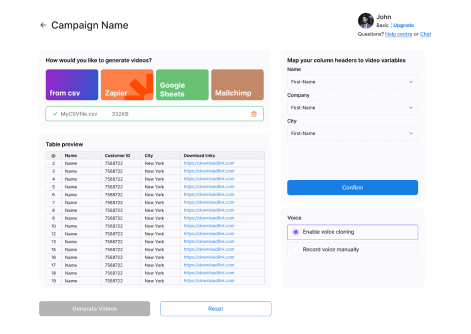
This is the actual BHuman flow for turning recipient data into video variables. It shows the kind of list-based setup these workflow pages are describing.
Source: BHuman product screenshot
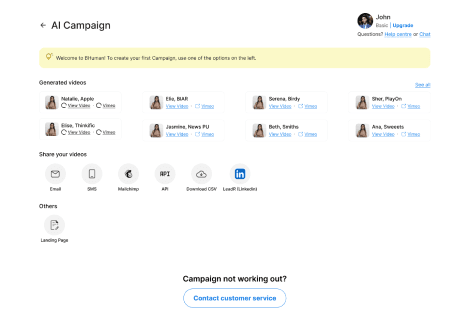
Once the videos are generated, BHuman can push them into email, SMS, API, CSV export, or landing-page workflows instead of keeping them trapped in a manual studio flow.
Source: BHuman product screenshot
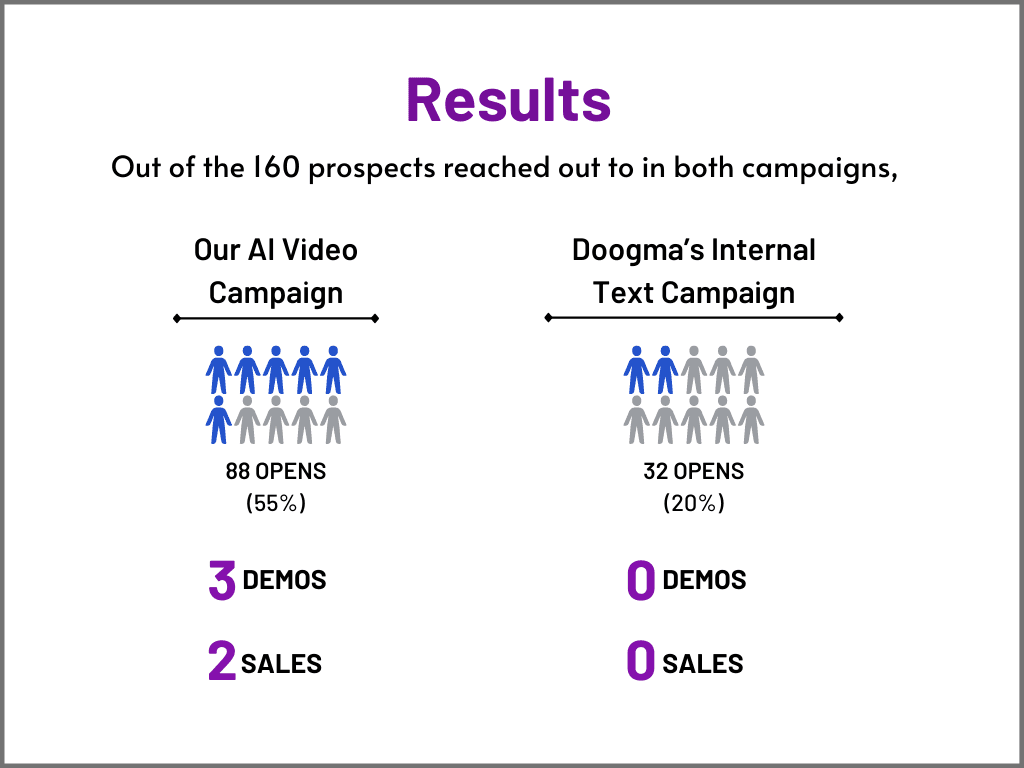
One public BHuman case study shows an AI video campaign outperforming the internal text campaign on opens, demos, and sales.
Source: BHuman case study
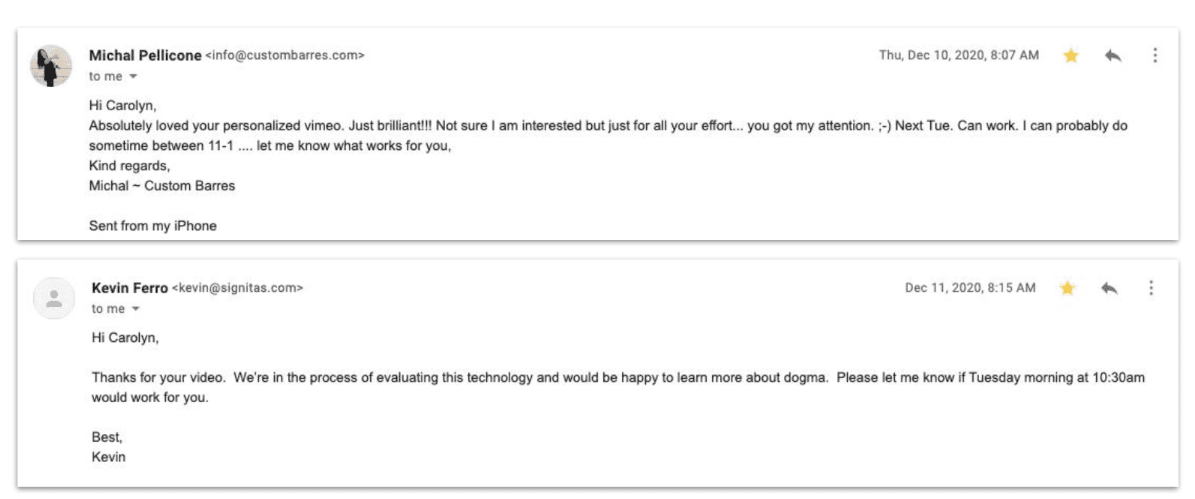
The same public case study also includes recipient replies, which is useful proof that the message felt personal enough to earn responses.
Source: BHuman case study
FAQ
The most useful moments are 90 days out, 30 days out, and whenever an account shows signs of churn risk or expansion readiness.
No. They also work well for healthy accounts where you want to reinforce value and set up the renewal conversation early.
Yes. You can use different templates and personalization fields for retention, risk recovery, and expansion motions.
Watch examples
These are public BHuman example videos connected to this same workflow motion, so buyers can see what the end result looks like before they dive deeper into setup.
Retail lifecycle video example
A repeat-touch ecommerce format for brands that want weekly or recurring lifecycle communication to feel more personal.
Customer check-in video example
A check-in style example for customer success and ecommerce teams that want follow-up to feel warmer than a generic lifecycle email.
Related pages
Useful if you are comparing training-style video with a more personal customer-facing renewal workflow.
Useful if you are comparing broad AI video creation against a retention-focused personalization workflow.
The closest existing BHuman use case to retention-focused renewal messaging.
Helpful if you want the same workflow to support expansion as well as renewal.
More workflows
Record once, prepare a personal WhatsApp-ready video for every contact, and route it through Make, GoHighLevel, or your API.
A practical guide for using BHuman with HubSpot to send personalized videos after form fills, demo requests, and onboarding milestones.
Start free
No card required — just pick a template and upload your contact list.
Support
Demos and support requests start here. Tell us what kind of help you need and we’ll plug you into the right workflow.