Lead handoff or new SDR sequence
Add personalized video to the first touch after a lead enters an SDR-owned sequence.
Salesforce personalized video workflow
Use this workflow when Salesforce already runs your pipeline but your follow-up still feels too generic. BHuman adds personalized video to outbound, inbound, and deal-stage follow-up without turning every touchpoint into manual rep work.
Trigger ideas
Add personalized video to the first touch after a lead enters an SDR-owned sequence.
Use Salesforce campaign or lead-source data to turn content engagement into a stronger next step.
Send a personalized follow-up when a prospect stops responding or misses a scheduled meeting.
Personalization
| Field | Example | Why it matters |
|---|---|---|
| first_name | Jordan | Personalizes the opener and avoids generic outreach language. |
| account_name | Beacon Health | Makes the message feel account-aware instead of template-based. |
| rep_name | Taylor | Keeps the message aligned with the rep who owns the relationship. |
| meeting_link | https://calendly.com/taylor/discovery | Lets each video drive directly to the right next step. |
| last_touch | downloaded our case study | Helps the video reference the actual context that triggered the follow-up. |
Setup
Start with a single use case such as new inbound follow-up, whitepaper-driven outreach, or stalled-opportunity reactivation.
Use the fields that matter most to the message, not every field in Salesforce. Most teams only need five or six.
Record a short message that can be reused across the sequence, then personalize the variables for each contact or account.
Route the video link into your Salesforce-driven sequence or use the API for a more automated handoff.
CSV example
first_name,account_name,rep_name,meeting_link,last_touch,email
Jordan,Beacon Health,Taylor,https://calendly.com/taylor/discovery,downloaded our pricing guide,jordan@beaconhealth.com
Copy ideas
Use these as starting points, then adapt the tone to your team and workflow.
Use this as the first personalized touch in a Salesforce-led sequence.
Hi {{first_name}}, I wanted to send a quick note because I think there is a strong fit for {{account_name}}. I am {{rep_name}}, and I can show you how teams use BHuman to add personalized video to outreach without recording one video per lead. If it makes sense to explore, here is the easiest next step: {{meeting_link}}.
Use this after a download, event, or case-study engagement.
Hi {{first_name}}, I saw that you recently {{last_touch}}. I wanted to follow up with something more personal than another generic email. If {{account_name}} is looking at better ways to improve follow-up and conversions, I would be happy to walk you through it here: {{meeting_link}}.
Use this when the opportunity is warm but momentum dropped.
Hi {{first_name}}, just sending a quick follow-up in case the timing slipped. Rather than let the conversation go cold, I wanted to send a brief note specific to {{account_name}}. If you still want to revisit this, you can pick a time that works here: {{meeting_link}}.
Why BHuman
BHuman lets sales teams keep the feel of personal outreach without asking every rep to record dozens of follow-up videos.
CSV exports and API handoffs make it easy to add BHuman without rethinking the whole Salesforce motion.
The same workflow can cover content follow-up, no-show recovery, stalled deals, and reactivation sequences.
Proof
These examples come from public BHuman reviews and customer stories, not made-up placeholder proof.
20-30x
A BHuman customer shared that personalized welcome videos for new sign-ups increased response rates by 20 to 30x compared with the old approach.
Source: User of the Week: Dori O'Neill
3x
One public BHuman review says the first campaign delivered 3x response rates, which is the kind of improvement these workflow pages are designed to support.
Source: BHuman customer review
Scale
Another customer described BHuman as the only platform they could fully automate at scale without struggling with quality.
Source: BHuman customer review
Real assets
These are not generic mockups. They come from public BHuman pages and product screenshots, so buyers can see what the workflow looks like in practice.
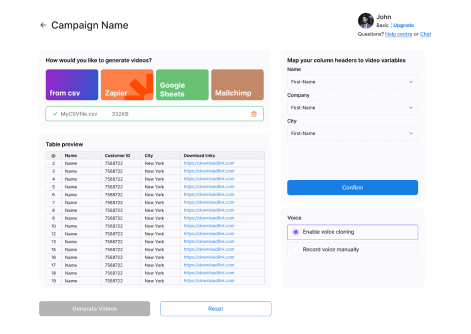
This is the actual BHuman flow for turning recipient data into video variables. It shows the kind of list-based setup these workflow pages are describing.
Source: BHuman product screenshot
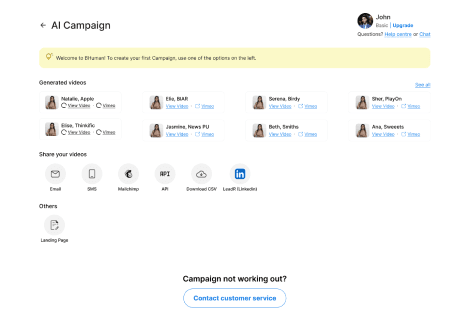
Once the videos are generated, BHuman can push them into email, SMS, API, CSV export, or landing-page workflows instead of keeping them trapped in a manual studio flow.
Source: BHuman product screenshot
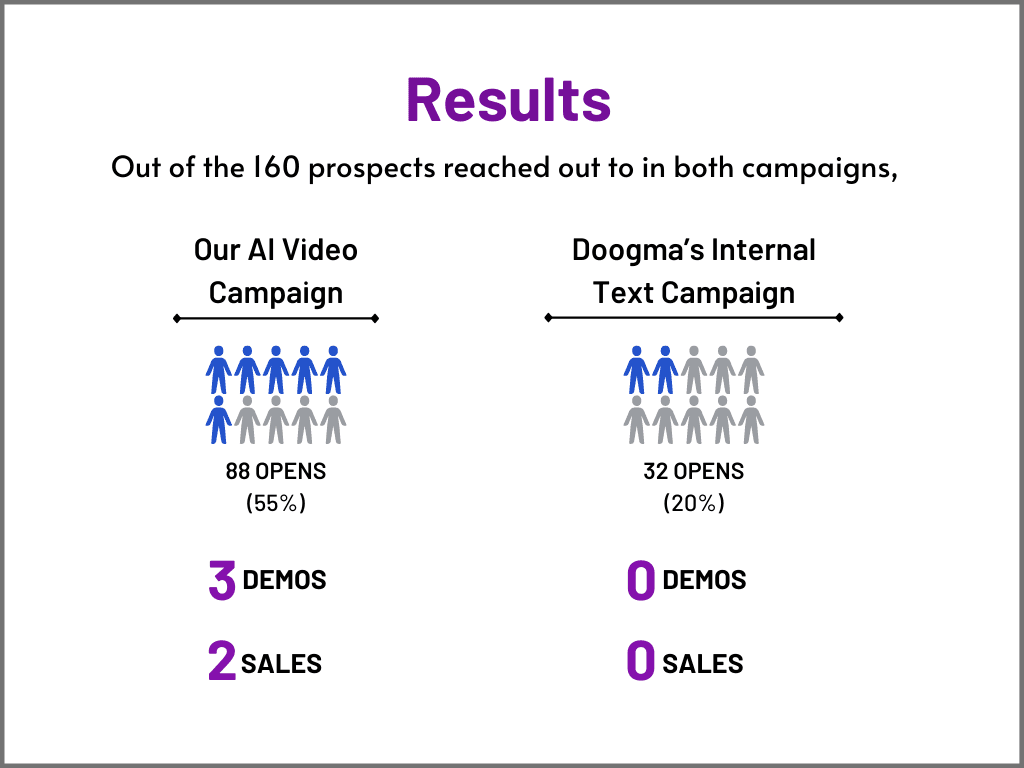
One public BHuman case study shows an AI video campaign outperforming the internal text campaign on opens, demos, and sales.
Source: BHuman case study
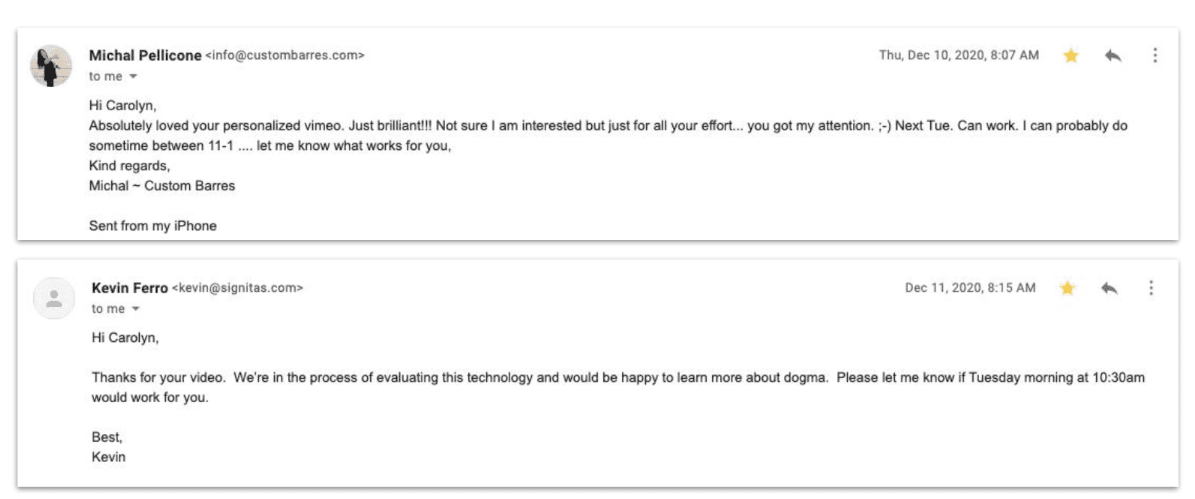
The same public case study also includes recipient replies, which is useful proof that the message felt personal enough to earn responses.
Source: BHuman case study
FAQ
Yes. Many teams start with exports and a repeatable send workflow, then layer in API automation later.
The strongest first use cases are inbound follow-up, content follow-up, and stalled-opportunity reactivation.
Keep it short. Most sales workflows do best with direct, relevant videos that respect the prospect's time.
Watch examples
These are public BHuman example videos connected to this same workflow motion, so buyers can see what the end result looks like before they dive deeper into setup.
Software outreach video example
A short outbound example for software teams that want prospecting to feel human instead of mass-produced.
Insurance sales video example
A consultative sales example for finance and insurance teams that need more trust than a generic nurture email creates.
Related pages
Useful if you are weighing hosted sales video against AI-personalized video generation.
Useful if you are deciding between rep-led sales video and a scalable personalization engine.
Maps closely to Salesforce campaign follow-up workflows.
Useful if you want to apply this workflow to reactivation rather than first-touch outreach.
More workflows
Record once, prepare a personal WhatsApp-ready video for every contact, and route it through Make, GoHighLevel, or your API.
A practical guide for using BHuman with HubSpot to send personalized videos after form fills, demo requests, and onboarding milestones.
Start free
No card required — just pick a template and upload your contact list.
Support
Demos and support requests start here. Tell us what kind of help you need and we’ll plug you into the right workflow.