Ticket received
Send a personalized acknowledgement so the customer knows the issue is real, visible, and owned by a person.
Support ticket update videos
Use this workflow when support updates need to feel more reassuring than a templated auto-response. BHuman helps customer support teams send more human ticket acknowledgements, progress updates, and resolution videos without recording every message from scratch.
Trigger ideas
Send a personalized acknowledgement so the customer knows the issue is real, visible, and owned by a person.
Use a more human check-in when the customer is waiting and reassurance matters.
Close the loop with a personalized update that confirms the fix and explains the next step if needed.
Personalization
| Field | Example | Why it matters |
|---|---|---|
| first_name | Daniel | Makes the update feel directed to one customer, not a support queue. |
| ticket_topic | billing export issue | Shows the message relates to the customer's actual problem. |
| ticket_status | in progress | Gives the customer clear context about where the issue stands. |
| owner_name | Maya | Shows who is responsible, which increases trust and accountability. |
| next_step | refresh the export and try again | Keeps the update actionable instead of vague. |
| help_link | https://help.bhuman.ai/tickets/123 | Gives the customer a direct place to review status or continue the thread. |
Setup
Start with one update type such as ticket received, waiting-on-engineering, or resolution delivered rather than every support state at once.
Use the topic, status, owner, next step, and help link so the video tells the customer exactly what is happening and what comes next.
Keep the tone clear, calm, and direct. The goal is reassurance and clarity, not a long explanation.
Launch with CSV or batch exports first, then automate from your support system once the workflow proves helpful.
CSV example
first_name,ticket_topic,ticket_status,owner_name,next_step,help_link,email
Daniel,billing export issue,in progress,Maya,refresh the export and try again,https://help.bhuman.ai/tickets/123,daniel@example.com
Copy ideas
Use these as starting points, then adapt the tone to your team and workflow.
Use this right after the support request is created.
Hi {{first_name}}, I wanted to send a quick note to let you know we received your ticket about {{ticket_topic}}. {{owner_name}} is taking point on it, and you can keep tabs on everything here: {{help_link}}.
Use this when the customer needs reassurance while the issue is still open.
Hi {{first_name}}, just a quick update that your ticket is currently {{ticket_status}}. {{owner_name}} is still working through the {{ticket_topic}} issue, and the next step on your side is to {{next_step}}. You can review the ticket here anytime: {{help_link}}.
Use this when the issue is fixed and the customer needs a clear close-out.
Hi {{first_name}}, wanted to let you know we have resolved the {{ticket_topic}} ticket. The next thing to do is {{next_step}}, and if anything still looks off you can jump back into the thread here: {{help_link}}.
Why BHuman
A personalized video can make a support workflow feel more human without sacrificing efficiency.
The same setup can support the full lifecycle of a ticket instead of only one moment.
Clearer, more personal updates help customers understand what is happening so they are less likely to send repeated status checks.
Proof
These examples come from public BHuman reviews and customer stories, not made-up placeholder proof.
20-30x
A BHuman customer shared that personalized welcome videos for new sign-ups increased response rates by 20 to 30x compared with the old approach.
Source: User of the Week: Dori O'Neill
3x
One public BHuman review says the first campaign delivered 3x response rates, which is the kind of improvement these workflow pages are designed to support.
Source: BHuman customer review
Scale
Another customer described BHuman as the only platform they could fully automate at scale without struggling with quality.
Source: BHuman customer review
Real assets
These are not generic mockups. They come from public BHuman pages and product screenshots, so buyers can see what the workflow looks like in practice.
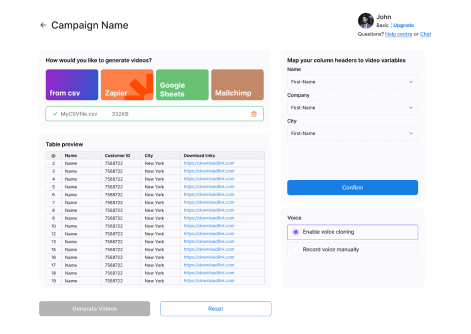
This is the actual BHuman flow for turning recipient data into video variables. It shows the kind of list-based setup these workflow pages are describing.
Source: BHuman product screenshot
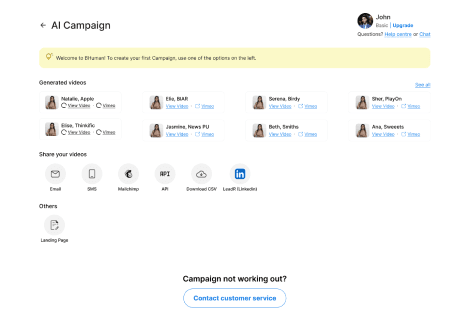
Once the videos are generated, BHuman can push them into email, SMS, API, CSV export, or landing-page workflows instead of keeping them trapped in a manual studio flow.
Source: BHuman product screenshot
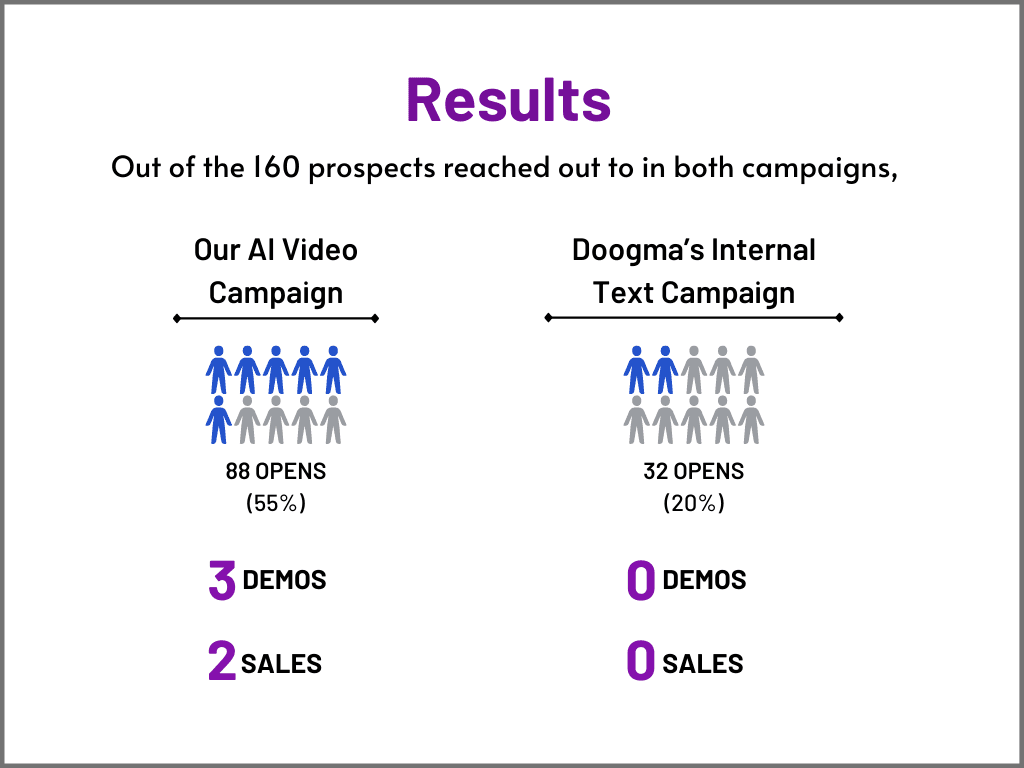
One public BHuman case study shows an AI video campaign outperforming the internal text campaign on opens, demos, and sales.
Source: BHuman case study
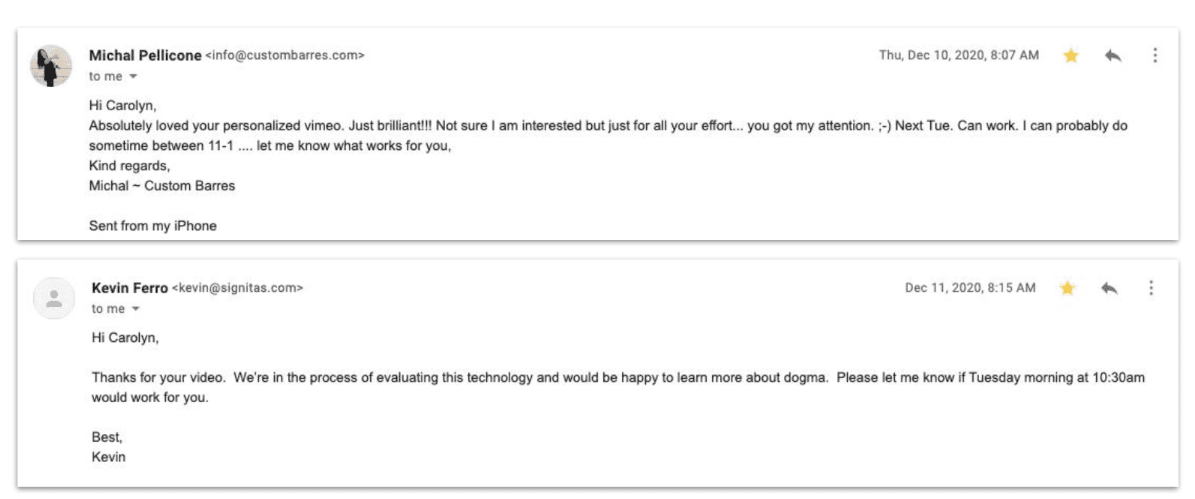
The same public case study also includes recipient replies, which is useful proof that the message felt personal enough to earn responses.
Source: BHuman case study
FAQ
The most useful moments are when a ticket is first received, when the customer needs an in-progress update, and when the issue is resolved.
Start with the customer's name, the ticket topic, the status, the owner, the next step, and the help link or ticket thread.
No. They are especially useful for teams that want a higher-touch experience without turning every support interaction into fully manual work.
Watch examples
These are public BHuman example videos connected to this same workflow motion, so buyers can see what the end result looks like before they dive deeper into setup.
Related pages
The closest existing BHuman use case to first-touch support acknowledgement.
The closest existing BHuman use case to resolution updates and issue close-out.
Useful if support updates also need a tutorial or explanation component.
Useful if you want the broader support and education context behind this workflow.
More workflows
Record once, prepare a personal WhatsApp-ready video for every contact, and route it through Make, GoHighLevel, or your API.
A practical guide for using BHuman with HubSpot to send personalized videos after form fills, demo requests, and onboarding milestones.
Start free
No card required — just pick a template and upload your contact list.
Support
Demos and support requests start here. Tell us what kind of help you need and we’ll plug you into the right workflow.